Parameters
With the parameters you adapt time intervals and automatic functions to your cruise: how often the route is recorded, when the anchor watch alarm triggers or whether recording starts by itself. Behind each parameter a question mark explains its meaning and unit.
How to get there
On the home screen tap Settings at the bottom and swipe left to the Parameters card. The card is visible to skippers, that is, users who can create their own cruises.
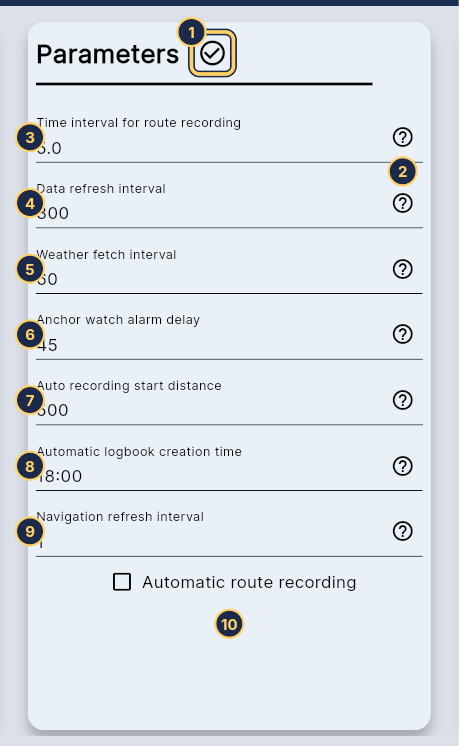
- Save – all parameters of this card
- Question mark – explains the parameter and its unit
- Time interval for route recording – seconds between two recorded route points
- Data refresh interval – how often the app reloads data from the server
- Weather fetch interval – minutes between two weather requests for route points
- Anchor watch alarm delay – seconds outside the anchor circle before the alarm triggers
- Auto recording start distance – metres from the starting point before automatic recording starts
- Automatic logbook creation time – time of day (HH:MM) for the automatic logbook entry
- Navigation refresh interval – seconds between two position updates on the navigation chart
- Automatic route recording – starts recording by itself as soon as you have covered the start distance
Change a parameter
- Tap the question mark (2) behind a parameter if you want to read up on its meaning.
- Enter the new value.
- Tap Save (1) in the header of the card.
The parameters at a glance
- Time interval for route recording (3): seconds between two route points during recording. Smaller values record more precisely but need more storage.
- Data refresh interval (4): how often the app reloads data from the server.
- Weather fetch interval (5): minutes between two weather requests for the route points.
- Anchor watch alarm delay (6): how long the ship must have left the anchor circle without interruption before the anchor watch raises the alarm.
- Auto recording start distance (7): distance from the starting point before automatic recording starts. Prevents unnecessary recordings in the harbour.
- Automatic logbook creation time (8): time of day at which the app creates a logbook entry every day.
- Navigation refresh interval (9): seconds between two position updates on the navigation chart.
- Automatic route recording (10): starts recording by itself as soon as you have covered the start distance. Off by default, see Routes and recording.
See also
- Routes and recording
- Anchor watch
- User: personal settings.