AIS ship traffic
With AIS you see the ships around you live on the navigation chart, the planning chart and in the anchor watch. For this you need an AIS receiver on board that provides its NMEA data via Wi-Fi in the ship's network. Tafiya connects to it and draws the ships with course and speed on the chart.
How to get there
On the home screen tap Settings at the bottom, swipe left to the AIS vessel traffic card and tap Configure AIS source. The card is visible to skippers and co-skippers, that is, users who can create or change their own cruises. The setting applies to the device.
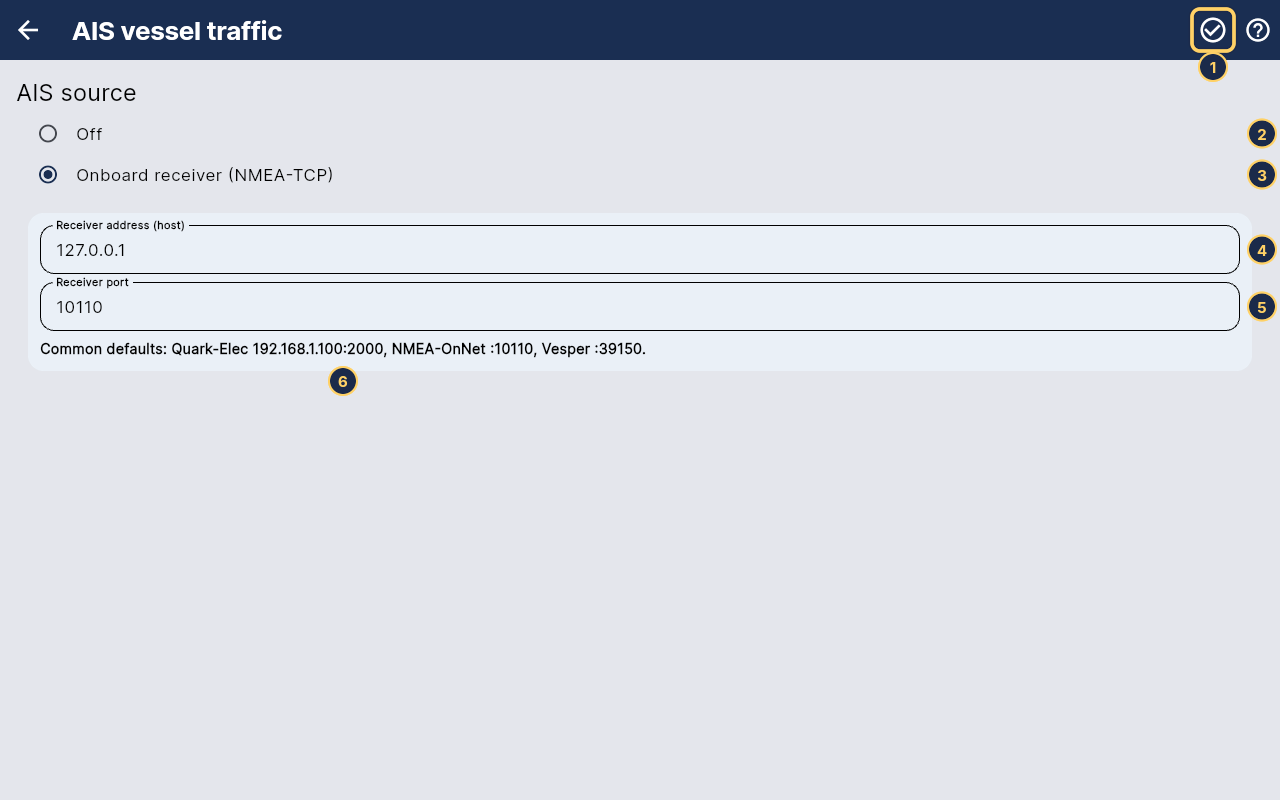
- Save
- Off – no AIS
- Onboard receiver (NMEA-TCP) – Tafiya connects via Wi-Fi to the AIS receiver on board
- Receiver address – IP address of the receiver in the ship’s network
- Receiver port – the TCP port on which the receiver sends NMEA data
- Common defaults of well-known devices
Set up the receiver
- Connect the device to the Wi-Fi on board in which the AIS receiver can be reached.
- Choose Onboard receiver (NMEA-TCP) (3).
- Enter the receiver address (4) and the receiver port (5). The line below (6) lists the common values of well-known devices, for example Quark-Elec 192.168.1.100 with port 2000.
- Tap Save (1).
With Off (2) you switch AIS off again.
AIS on the chart
On the navigation chart you show or hide the ships with AIS ship traffic (13). Each ship appears with a course vector; a tap shows name, ship type, MMSI, destination, course, speed, distance and CPA/TCPA, that is, the closest point of approach and the time until then. In the anchor watch you see this way who is anchoring or moving near you at night.