Activate trial period
So that you can be sure Tafiya suits you, you try the app free of charge for 21 days with all features. During the trial period you can create your own cruises and use everything the skipper otherwise has. There are no adverts.
How to get there
There are two ways into the trial period:
- You register as Skipper. Then the trial period runs as soon as you have confirmed your e-mail address, see Registration.
- You registered as Crew and start the trial period yourself later: Settings, card User, tab Account data.
The button appears only as long as you have never used the trial period.
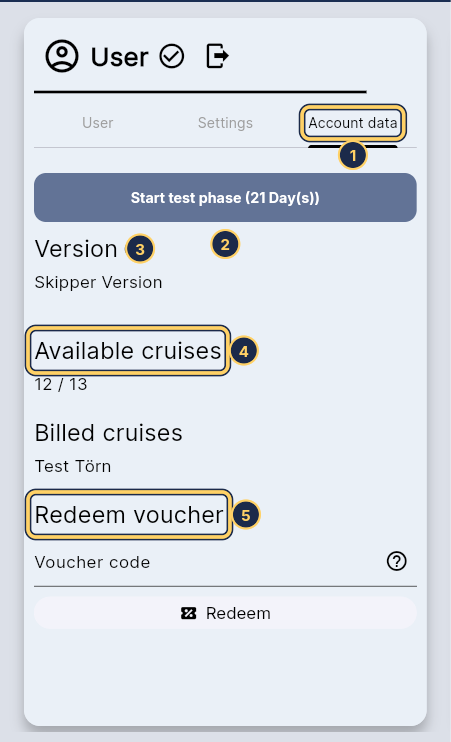
- Account data – third tab of the user settings
- Start test phase (21 days) – one tap is enough, the button disappears afterwards
- Version – Skipper Version (create cruises) or Crew Version
- Available cruises – purchased cruises not yet used up
- Redeem voucher – enter the code and tap Redeem
Start the trial period
- On the home screen tap Settings at the bottom.
- On the User card switch to the tab Account data (1).
- Tap Start test phase (2) and confirm the note.
Under Version (3) it then says “Skipper Version”. On the home screen the app shows next to the logo how many days remain.
After the trial period
Once the trial period has expired, the app tells you at the next login. You can keep using Tafiya as a crew member: view cruises, add pictures and look at recorded routes. To create your own cruises again, you buy a quota of cruises, see Buy cruise quota. Purchased cruises are shown under Available cruises (4); you redeem a voucher code under Redeem voucher (5).
See also
- Create a cruise
- User: the other settings of your account.