Assemble the crew
The skipper assembles the crew of a cruise in the cruise data. Every member gets a board role, and one or more members can become co-skippers with full rights to the cruise.
How to get there
Open the cruise, tap the Cruise data tile in the cruise hub and scroll to the Crew section. The creator of the cruise and the co-skippers can edit the crew. Changes take effect only when you save the cruise data with the tick at the top right.
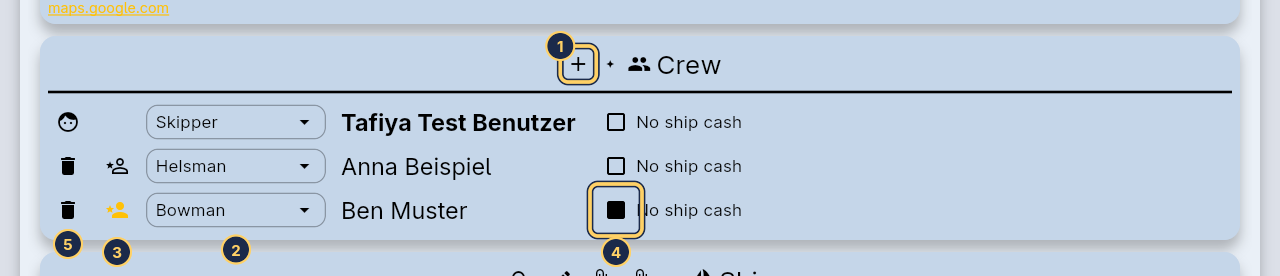
- Invite – opens the dialog “Invite crew member”
- Board role of the member
- Co-skipper – filled star: the member has the same rights to the cruise as you
- No ship cash – the member does not take part in the ship's cash
- Remove – takes the member out of the crew
Invite a crew member
You invite fellow sailors by their e-mail address. There is no search across all Tafiya users; user data is visible only to the person, their fellow sailors and the support team.
- In the Crew section tap Invite (1).
- Enter the person's e-mail address and optionally their name.
- Tap Invite.
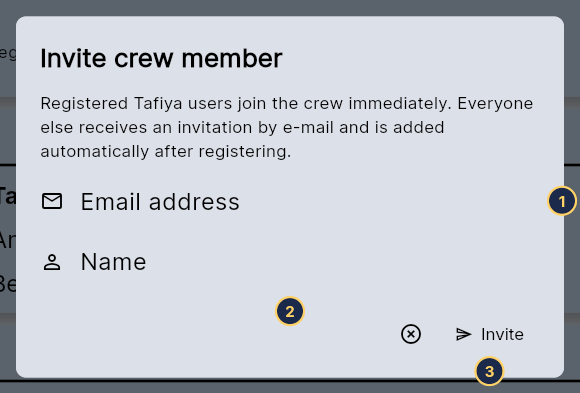
- E-mail address of the person (required)
- Name – optional; shown in the crew until the person has registered
- Invite – registered Tafiya users join the crew immediately, everyone else receives an invitation e-mail
What happens next depends on whether the person already uses Tafiya:
- If the person is already registered with Tafiya, they join the crew immediately and receive a notification.
- If they are not registered yet, they receive an invitation e-mail with links and QR codes to the app stores. As soon as they register with this e-mail address, they are added to the crew automatically and you are notified. The invitation is valid for 30 days.
Open invitations are listed below the crew list in the section “Invited, not yet registered” and can be withdrawn there.
Board roles
You assign each crew member a role via the selection in the crew row (2): skipper, helmsman, bowman, boatswain, guest or trainee. The role appears in the crew list and in the mileage confirmation.
Co-skipper
To have a deputy for the skipper, you mark crew members as co-skippers. A co-skipper may do everything you may do as creator of the cruise: keep the logbook, change cruise data, manage the ship's cash. Several co-skippers are possible.
- In the crew row tap the star (3). Filled means: co-skipper.
- Save the cruise data.
- If you assign the board role Skipper to a crew member, they automatically become co-skipper. If you change the role again, the right expires.
- Only the creator of the cruise can grant the co-skipper right. If a co-skipper selects the role Skipper for someone, the role stays set but the right does not, and a note appears.
Ship's cash
For each crew member you decide with No ship cash (4) whether they take part in the ship's cash. Excluded members can still be included in individual receipts, see Manage ship's cash.
Remove a member
With the bin (5) you take a member out of the crew. You cannot remove yourself as creator.
See also
- Cruise data: everything else you set on the cruise.
- Crew list: the crew with roles and contact details for everyone on board.
- Assemble the crew (FAQ)