AI model
Tafiya's AI functions, that is, AI shopping list, AI recipe suggestions and AI packing list, run on a language model. By default a Google Gemini model via Tafiya's central key is set up. You can switch provider and model and store your own API key; usage then runs on your own quota.
How to get there
On the home screen tap Settings at the bottom, swipe left to the AI model card and tap Configure AI model. The card is visible to skippers and co-skippers, that is, users who can create or change their own cruises.
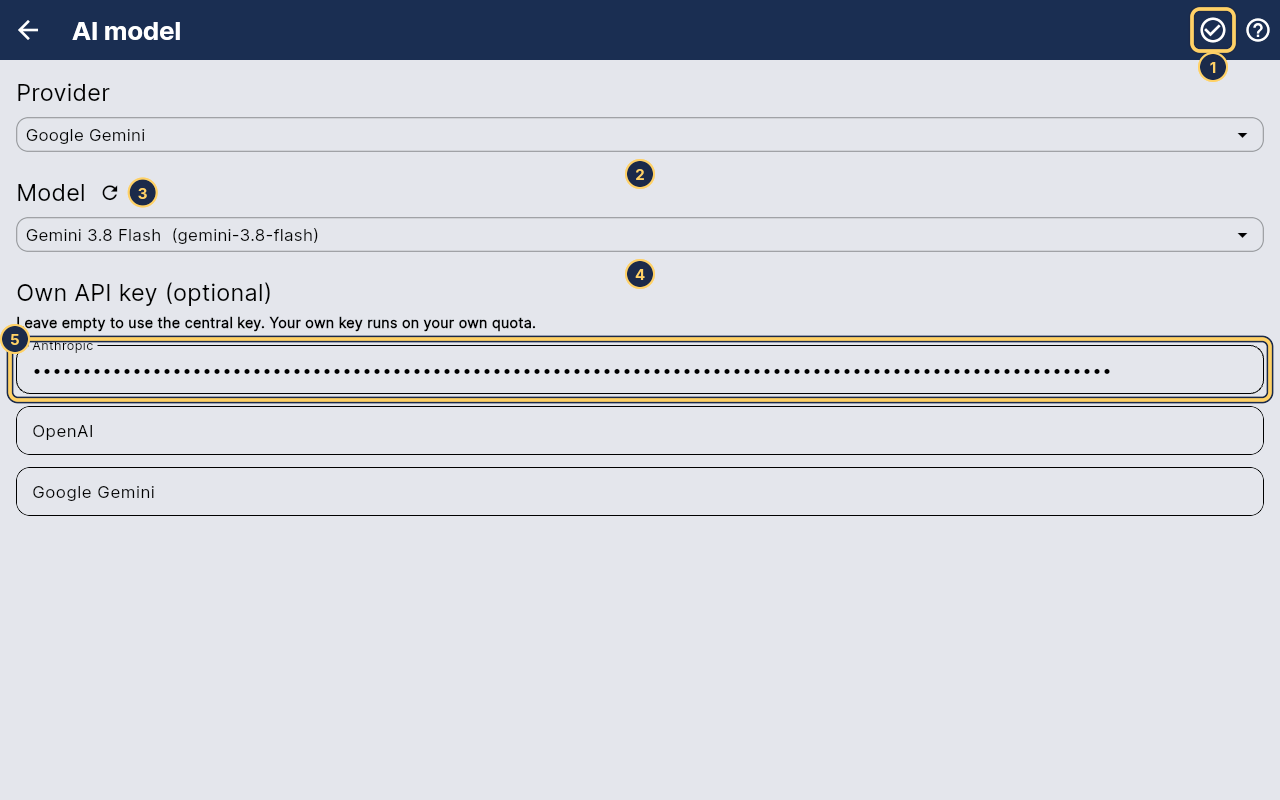
- Save
- Provider – Google Gemini, OpenAI or Anthropic
- Reload models – fetches the current model list from the provider
- Model – loaded live from the provider; without a connection the stored list
- Own API key per provider – empty means: Tafiya’s central key
Choose provider and model
- Choose the provider (2): Google Gemini, OpenAI or Anthropic.
- Choose the model (4). The app loads the list live from the provider; with Reload (3) you fetch it again. Without a connection or key it shows the models stored with Tafiya.
- Tap Save (1).
Use your own API key
If you have your own key with a provider, enter it in that provider's field (5). Empty fields mean: Tafiya uses its central key. After entering it, Enter reloads the provider's model list with your key. The key is stored with your user and applies on all your devices.